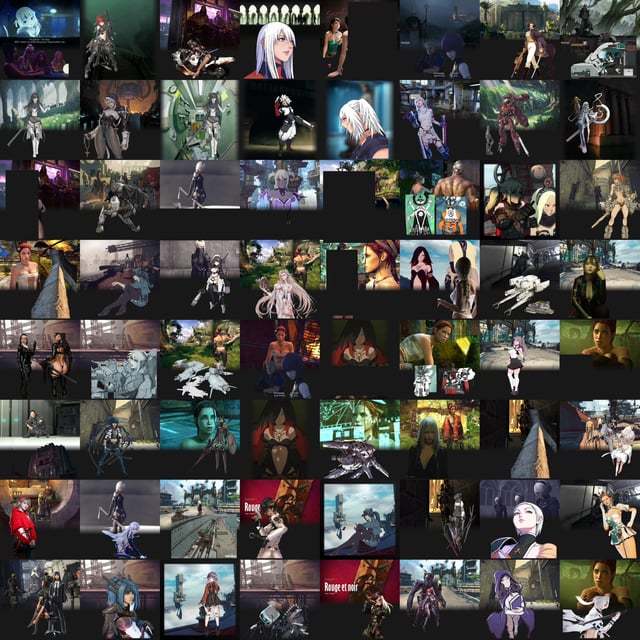
Collage training for Chroma and Illustrious
Consider this; if you have 100 training images , why are there not 100 image outputs for every epoch when training the lora , to match against the 'target' training image? Reason: LoRa training is done entirely in latent space.The training image us converted to a vector using Variational Auto Encoder , the VAE.Have you done reverse image search? Reverse image search also converts the input image to its latent representation.Try doing a reverse image search on composite of two images , i.e two images side by side like a woman in a dress and a sunflower.Results are images with dresses , and images with sunflowers , or a mix inbetween (if such images exist) Conclusion: The VAE representation can hold two images at once , or more. By using composites in a 1024x1024 frame you can train on two images at once. However , when putting two images in a single 1024x1024 frame the learned pixel pattern will be relative to the image bounds. Example : single full body person in 1024x1024 image takes up the full 1024 pixel height.Put two people next to one another in the 1024x1024 frame , and both people will still take up the full 1024 pixel height.Put 4 people in a 1024 x 1024 frame in a grid , and each person takes up half the image size at 512 pixel height. The AI model cannot scale up or down trained pixel patterns relative to image dimensions.If you want image output to only be full length people , ensure the trained patterns are the full 1024 pixel pattern height.Granted; the same principle applies in the x-axis.If you have a landscape photo , and the pixel pattern has a pleasant composition along the x-axis , then you can place two landscape photos on top of one another to train the horizontal pattern i.e 2 landscape images each 1024x512 in size to build the 1024x1024 frame.Verify by doing reverse image search on the frame. Try doing a reverse image search on blurry images versus high resolution images.You will find that blurry images are added to VAE but only up to a certain point.One cannot fit more pixels into a 1024x1024 frame than what already exists.You will find that based on the reverse image results how much the image can impact the latent representation.Why can an AI model create images that are not 1:1 to its training data?How come when you prompt a sword with AI , it sticks out at both ends of the handle?Reason: The AI model learns localized patterns. Unconditional prompting.The AI model also learns to associate patterns with text. Conditional prompting.The input X to the AI model is a mixed ratio of conditional prompting and unconditional prompting set by the CFGGiven as X = X_unconditional (1-CFG) + x_conditional CFGYou can train the lora so that the model learns purely from unconditional prompting by not having any caption text at all.Or , you can make the model learn conditional prompting that describes all the pleasant looking stuff in the training images you have.What is a prompt? The prompt text is also transformed into an encoding using the text encoder.This is done by converting each common word or common word segment of your prompt into a numerical vector. For example; CLIP_L has dimension 768 and the batch size is 75 tokens (excluding the 2 delimiter tokens at the start end of the encoding , the real batch size is actually 77) .So any text you write in CLIP less than 75 'words' in length can be expressed as a 75x768 matrixThis 75x768 matrix is then expressed as a 1x768 text encoding. How is this done? Lets look at a single element , a 1x75 part of the text encoding.Each of these 75 positions are a sine wave at fixed frequencies , 75 fixed frequencies in total in descending order. The frequencies are alternating , so all the even positions have +0 degrees offset and all the odd positins have +90 degrees offset. The token vector element sets the amplitude of the sine waves. What is a soundwave? It is a sum of sinewaves with different frequencies at a given amplitude. Ergo: Your 1x75 element row is a soundwave. The 1x768 text encoding are all the 768 1x75 soundwaves played at once. The text encoding is a soundwave.The way the text in your prompt impacts the text_encoding , is analgous to components within soundwaves like music.How to make stuff in music more prominent?First method , at a given freqency magnify the amplitude of the noise.This is how weights work , they magnify the token vector by a given factor , e.g (banana : 1.3) is the token vector for banana multipled by the factor 1.3 , and consequentially the amplitude of the soundwave at whichever position banana is locates at will be amplified as well The second method to engance sound presence is to reoeat it at different frequencies.You know that sound with closely matching frequencies will interefere with one another.But sound at low frequency and the sane sound played at high frequency is harmonious.Ergo; to enhance presence of a concept in a prompt you can either magnify it with weights or you can repeat the exact same word or phrase further down in the batch encoding.How does this relate to captioning in LoRa training? If you want the conditional prompting training to focus on a specific thing in the image , repeating a description at different section in the prompt is good.This is especially useful in natural langauge text encoder with a large batch size if 512 tokens.This also means that as long as the 'vibe' of the captioned text matches whats in the image , the LoRa effects will trigger on prompts close to that 'vibe' as well.It really is up to how you plan on using the lora with the AI model and what prompts you generally use that decides the captioning.Third part. Have you noticed how AI models can create realistic depictions of anime characters or anime depictions or real celebrities?The AI model is built like a car factory , that has a conveyor belt on one end , multiple stations within the factory that assembles stuff , and the stuff that pops out on the other side of the conveyor belt is some kind of car.You can throw absolutely anything onto the conveyor belt at the stations will turn it into a car. A tin can , a wrench , a banana or something else.The stuff you put on the conveyor belt is the prompt.The stations are the layers in the AI model.You will find that each layer in the AI model is responsible for one task to create the 'car' ie the ginished image.One layer can set the general outline of shapes in the image.Another layer might add all the red pixels to the image.A third layer might add shadows.A fourth might add grain effects or reflective surfaces. It all depends on AI model but all if these layers are usually very 'task specific'So when training a lora , you are actually training all if these stations in the car factory , seperately , to build the 'car' the image.Shape matters the most prior to creating an image concept. There it is well advised to have a clear contrast between all relevant shaoes in the lora training images.A woman against a beige wall is a poor choice , since human skin blends well into beige and white surfaces.But a woman against a blue surface that clearly contrasts the shape is excellent.Consider that you can create AI images from existing training imagesThat means that the AI model learns patterns from the training image , and uses those different patterns it knows to make new imagesIf you zoom in on the pixel pattern in any AI image you can find jpeg artifacts withinthe AI image , these normally only appear at the edges in normal imagesSuffice to say this method works 😀Practically , if you make a sword in illustrious , you see how the sword sometimes goes out both ends?The CFG parameter in the AI model is a blend between what you prompt , and 'adjecent pixels in the image'The patterns which the AI model learns are 'localized' within the training imageSo the reason why the collage method works is thanks to unconditional prompting parameterThe prompt you actually feed the AI model isnt purely the text promptAsk GROK on Twitterwhat is the relationship between cfg conditional prompting and unconditional prompting?The relation is X = CFG x_conditional + (1-CFG) x_unconditionalThe x_unconditional uses the image created thus far as the input argumentSo it 'fills in patterns' where it is likely for those patterns to beBut the gist is that this relationship is all about pixel to pixel adjecencySo location in the training image for specific pattern don't matterThe collages is like a difficult math problem you task the AI model to solve , so it can become more adept at solving easier math problems later onSo the AI model will usually never be able to recreate the collage training images 1:1 , but the AI model will become very adept at recreating the patterns within the training image in the attemptThe tool to build collages doesn't matterThe most important thing to know is that the trained pattern will always be relative to the imageSo ideally one should have at least one pattern that goes end to end in the imageExample image hereThe second thing to know is that AI images learn patterns that have good contrast to backgroundimageThe 'shape layer' as I call itBenefit of collage training that you can easily crop out bad patterns. Condensing the set to only good patterns.One more thing; if the background of the collage is #181818 gray it will perfectly match the gray background on TensorThis creates a cool 3D effect in the gallery 😀Syntax has examples too in illustriousI always link this video as a source if you wanna know absolutely all of the theory. Its from the SD1.5 days but still is true for present models https://youtu.be/sFztPP9qPRc?si=B_B353yktSpeKeicThis one has a lot of nonsense overly dense information but the gradient illustration is very cool https://youtu.be/NrO20Jb-hy0?si=6us5FRM7qhmD_auHCheers!