Following this series of articles on LoRa training, today it’s time to touch on the subject of the Trigger Word in style LoRAs.
I invite you to read the previous article where I touched on the subject of the Text Encoder, as it might help you better understand today’s concepts. Training the Text Encoder in LoRa: Why it Matters for Style | Civitai
Note: This article aims to be easy to understand. I will not use complex technical terminology (like weights, vectors, or matrices) and will even skip over some deep theoretical concepts to simplify understanding.
All this time I’ve been training style LoRAs, most of the time I don’t train them with a trigger word. Mostly for the sake of convenience: by not having to worry about whether you are using the keyword or not, you simply apply the LoRa and forget about the rest.
However, for this experiment and using the same dataset from the previous article, I trained another LoRa simply by adding a trigger word to all the images. But first, let’s go through the theory before looking at the results and differences.
Although the examples given here focus on LoRa style, many concepts apply equally to LoRa character.
What is the Trigger Word?
The trigger word is the tag you will use to activate your LoRa... forgive the redundancy. The idea is that this tag is like an empty "container" that we will fill with whatever we want to train. Usually, invented words or tags with unique characters (like letters swapped for numbers) are used to ensure that this tag doesn't previously exist in the model's knowledge, thus giving us a clean canvas.
There are two ways to use the trigger word:
Removing tags: For example, if the style you want to train is a realistic style, what you should do is delete those tags that represent the realistic style and commonly appear with the auto tagger like “nose, lips, realistic, photorealistic”. This will cause those characteristics seen in the images to associate directly with the trigger word since they aren't tagged.
Keeping tags: If you leave “nose” and “lips” written in the dataset, surely your results with only the trigger word won't have those same noses or lips seen in the dataset images, but you will have the colors and strokes of your style. If you want to obtain the same facial structure, it will suffice to write "nose" and "lips" in the prompt to get those characteristics. This approach is useful for flexible LoRAs.
Is it necessary?
Let’s analyze the two approaches:
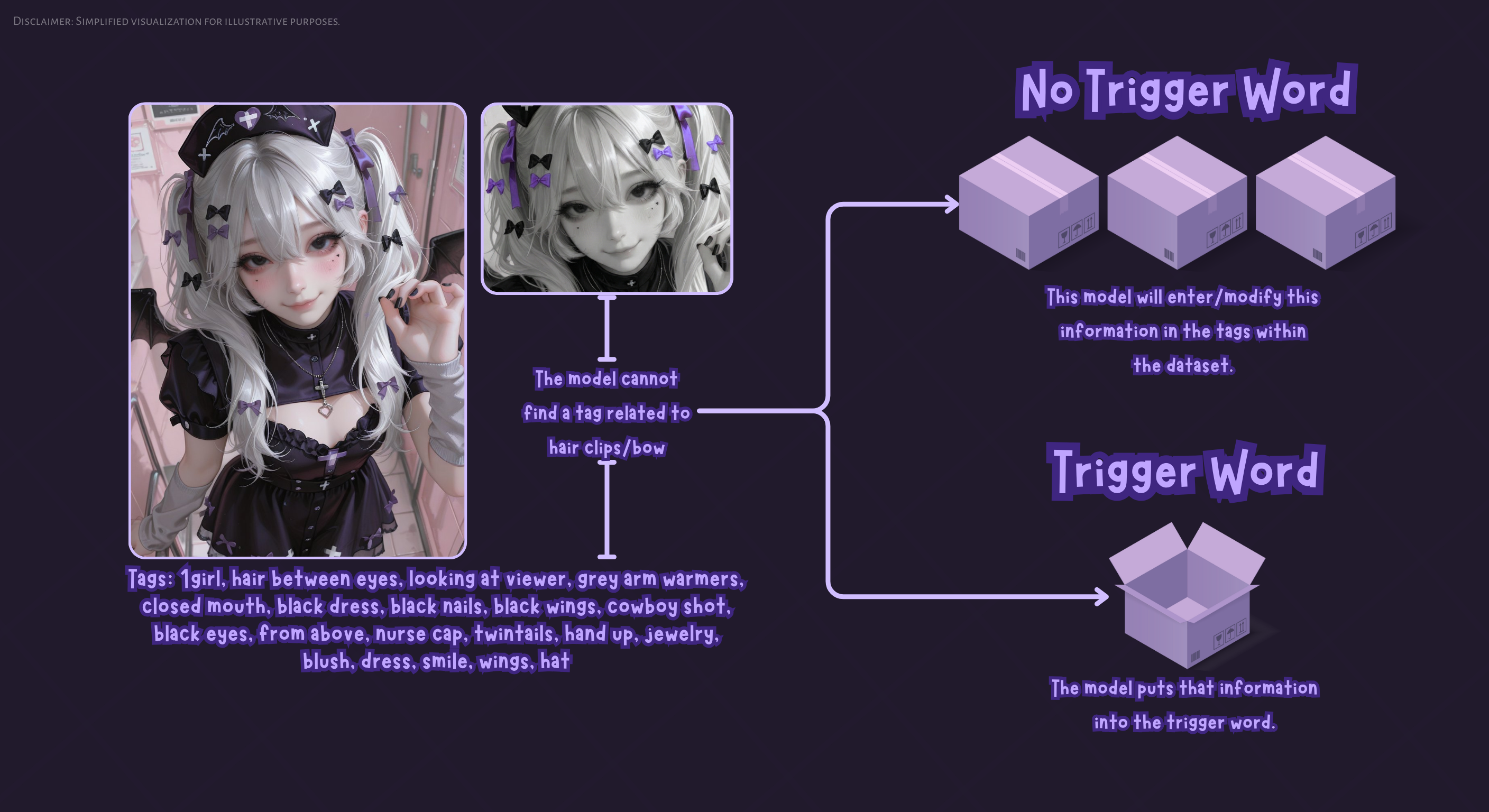
Method without Trigger: By not using a trigger word when we train a style LoRa, the existing tags are modified. The most common one is 1girl, but generally, the style starts to train onto different common tags within the dataset. What happens with this? Well, in ambiguous prompts with fewer than 5 tags, for example, the style will be poor and look diluted. But when using many tags—specifically those mostly used in the dataset—the style will start to look much more present.
Method with Trigger: By using a trigger word, we are giving the training a specific word where it can put everything that isn't tagged in the image. In a style, this would be the lineart, the brushstrokes, the color, etc. But one also has to be much more careful with tagging and prioritize a varied dataset to prevent the trigger word from picking up objects, concepts, poses, etc. However, unlike the method without a trigger, we would only need this trigger word for the style to appear with all (or most) of its characteristics (depending on which approach we decided to use with the trigger word).
Note: This graph is a simplification; this would have to happen several times within the dataset.
The Problem with the Trigger Word:
As I mentioned before, our trigger word is a container waiting to be filled with information. How does the model know what information to put in there?
Simple: the model looks at what doesn't change between images and associates it with your tag.
If we want to train a chair, that chair must appear in all images with the trigger word.
The problem: If the dataset isn't very varied, the model might associate unwanted things. Let’s say that in all the photos of the chair, a table also appears in the background. Since the table doesn't change and always accompanies the trigger, the model will think that “ch4ir” means "A chair AND a table." It will start putting the table inside the concept. (In this tag example, it would suffice to tag "table" in the dataset since it’s something the model already has broad knowledge of, which would prevent associating that table with the chair. The real problem occurs with things like poses, gestures, and other things we usually don't tag or that the model doesn't have much knowledge of).
Once this is understood, let’s move on to talk about the examples and visual differences.
Analysis of Results
Note: All examples were made with the same configuration and a static seed.
1. Presence of Style

Okay, right off the bat, you can say that with the trigger word, the style looks much more present. However, some flaws also appear, such as the combined color of the kimono and the change in the hand gesture compared to the version without a trigger. This could be an indication that our LoRa was surely already overtraining, so we'll overlook that.


In these examples, the strength of the style is much more noticeable using the trigger word, and there is little change in the general composition.
2. Background problem with trigger word
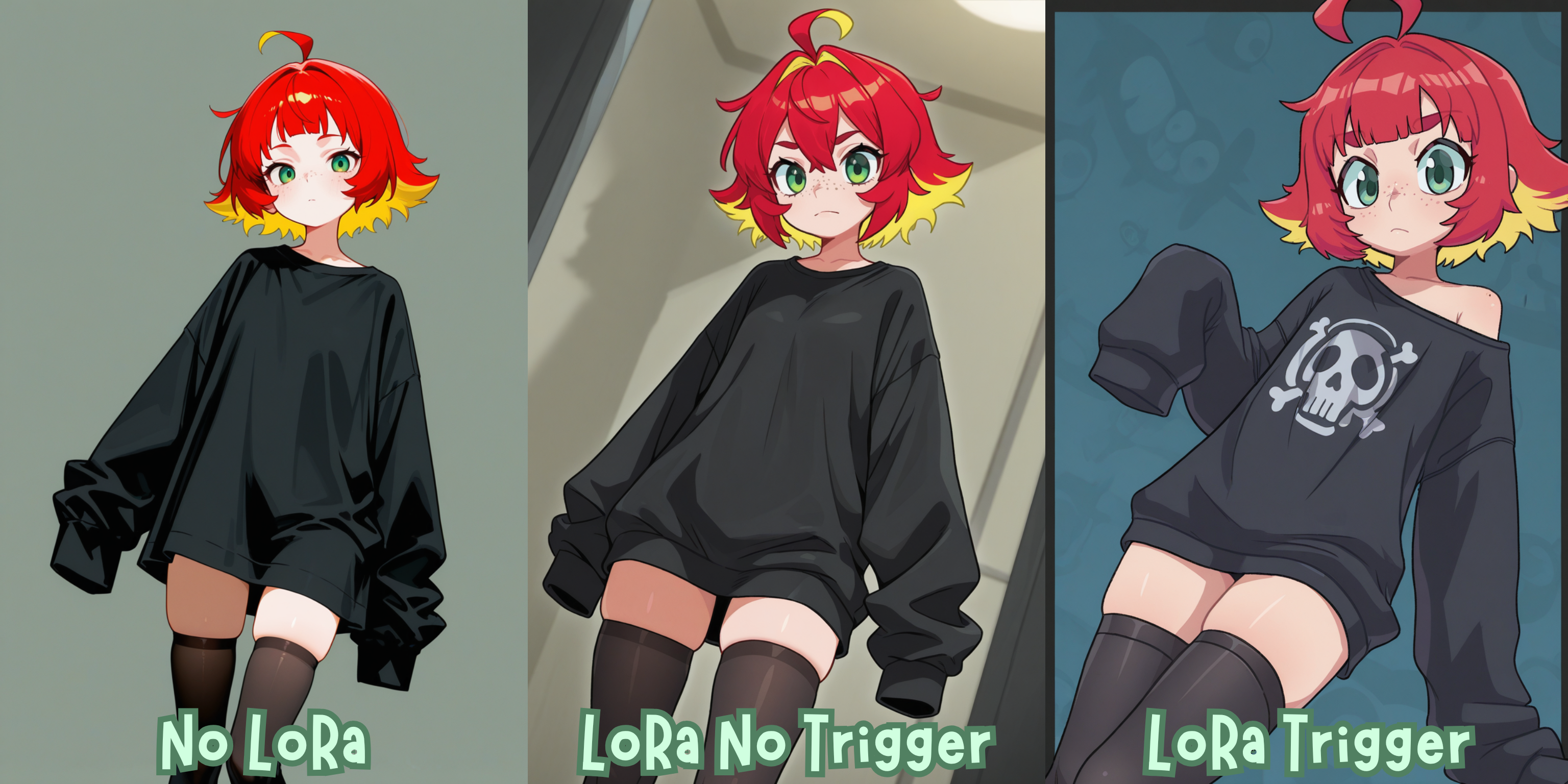
Here is an example that lets us see the problem we mentioned earlier in the theory. Leaving aside the fact that the intensity difference between "with" and "without" is very large, let's talk about that background in the trigger word example. That background style appears in the vast majority of images in the dataset, and it seems the trigger word has been learning it; specifically that it is a solid color, with a border and a subtle pattern. This is easy to fix. Since the prompt didn't specify what background was wanted, the trigger filled the void with what it saw most (that repeated background). By simply putting a setting (beach, street, city) or a color (white background, green background), it will surely stop appearing.
3. Prompt taken from the Dataset
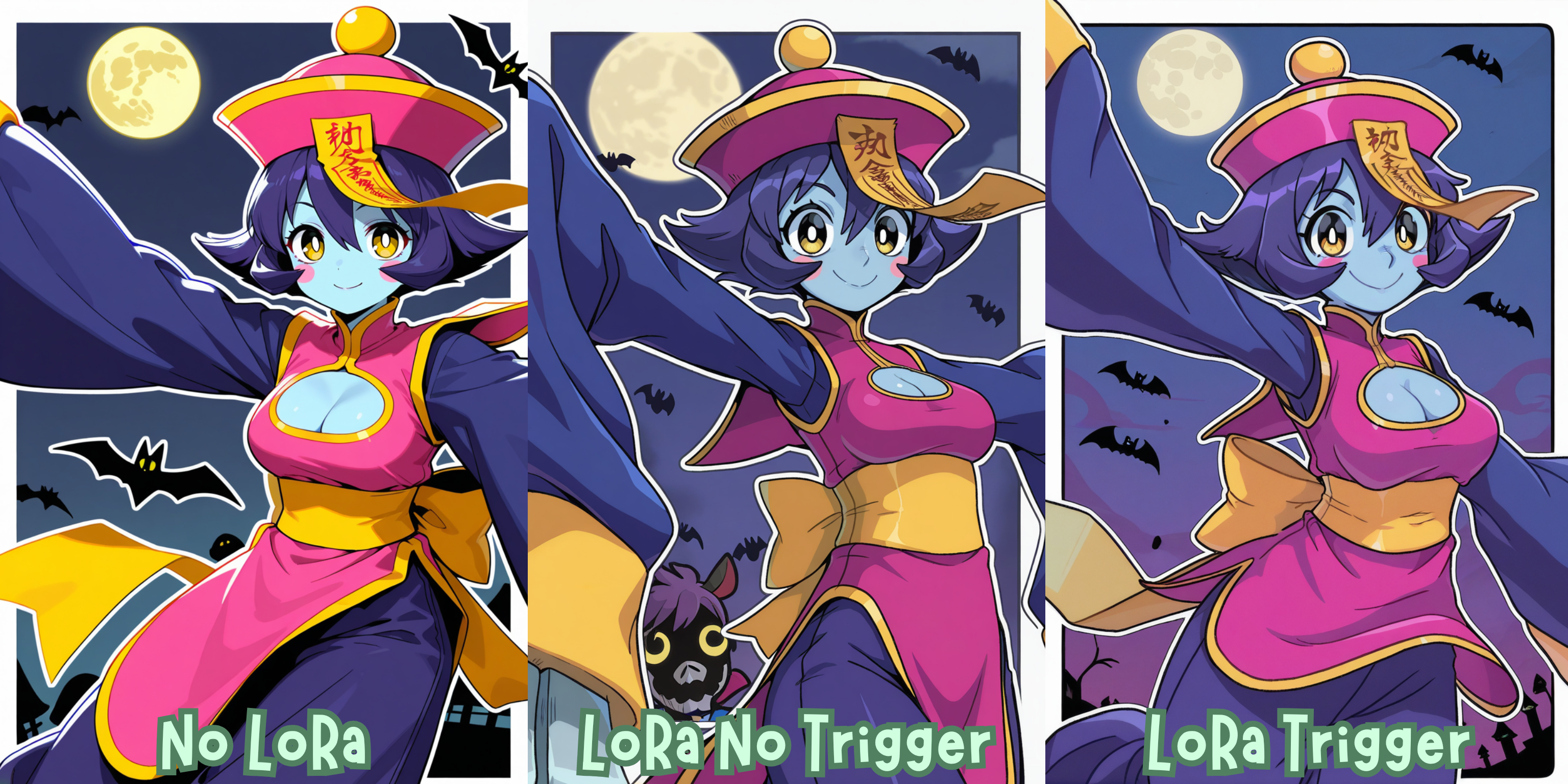
Then there is this example where I took a prompt directly from the original dataset. We can see that here there is much less difference between the "without" and "with" trigger versions. This relates to what we explained in the theory section: the style began to associate with different tags within the dataset. This means that, in the version without a trigger, to get a result just as strong as in the version with a trigger, we must use mostly the same descriptive tags that were used in the dataset.
So, which one to choose?
It seems that the option with a trigger word is the best option, but it involves a bit more work behind the scenes by needing a more varied and much better-tagged dataset. Choose whichever fits your workflow best. For my part, I think I will start training more LoRAs with trigger words.
If you are knowledgeable about this topic and notice I’ve made a mistake at any point, please let me know! The last thing I want to do is misinform people, and if that happens, I will edit this article as soon as possible to correct the errors.
LoRa Configuration
Base Model: Illustrious V1.0
Repeats: 5
Epoch: 10
Steps: 990
Batch Size: 4
Clip Skip: 1
UNet learning rate: 0.0005
LR Scheduler: cosine_with_restarts
lr_scheduler_num_cycles: 3
Optimizer: AdamW8bit
Network Dim: 32
Network Alpha: 16
Min SNR Gamma: 5
Noise Offset: 0.1
Multires noise discount: 0.3
Multires noise iterations: 8
Zero Terminal SNR: True
Shuffle caption: True
Other articles that may interest you:
Web App: Booru Prompt Gallery V5.1 | Civitai
Web App: Booru Tag Gallery | Civitai
App: Regional Multi Crop - Dataset Tool | Civitai
Tools I use for LoRa training | Civitai
Training the Text Encoder in LoRa: Why it Matters for Style | Civitai
That’s it!
Stay hydrated and don’t forget to blink.